
Fixfolder · Airbnb payout questions
How do co-hosts get paid on Airbnb?
The listing owner sets up co-host payouts in the listing’s settings, and Airbnb pays the co-host’s share out of each booking, based on the host’s potential earnings for each booking
. Any amount that remains after co-host payouts will be paid to the host.
Searching for a “split payment”? Airbnb calls this co-host payouts. Its page “Split payouts between different payout methods” is about your own payout methods and says: If you work with a co-host and want to share a percentage or fixed amount of your earnings with them, you can do this by setting up co-host payouts.
Help 1343
Co-host payout settings, in Airbnb’s words
Co-host payouts can only be set up and edited by the listing owner.
The options:
Cleaning fee: You'll share the amount you set as your cleaning fee in your listing details
Cleaning fee plus percentage: You'll share the amount you set as your cleaning fee in your listing details and add a percentage per booking (that excludes the cleaning fee)
Percentage payouts: Add the percentage you'd like to share per booking and then choose to exclude or include the cleaning fee amount in the percent calculation
Fixed amount payouts: Add the amount you'd like to share per booking
On desktop: Listings → your listing → Your space → Co-hosts → the co-host → Payouts → Confirm with co-host.
After a host has set up a co-host payout, the co-host has 14 days to confirm or decline.
Any updates a host makes to existing payouts will only apply to the co-host’s payouts for bookings that start after the co-host confirms the update.
Hosts can only share payouts with a co-host for guest stays on Airbnb. Service or Experience bookings, host damage protection reimbursements, and Resolution Center payouts aren’t included.
Help 3389
How Airbnb calculates the share
To calculate the host’s potential earnings for a booking, multiply the nightly price by the number of nights, and add any additional charges to the guest, like a cleaning fee. Then subtract the host service fee and, if applicable, other taxes and fees.
If the host’s potential earnings amount is not enough to cover co-host payouts, co-hosts may receive a payout that is less than they expect.
With two or more co-hosts, Airbnb pays cleaning-fee shares first, then percentages and fixed amounts, each from highest to lowest. Timing is on the payout schedule page. Help 3389
How it shows in your Airbnb report
One cabin booking in the free example workbook (fictional data):
| Line | Amount |
|---|---|
| Gross earnings | 506.00 (example) |
| Service fee | 15.18 (example) |
| Reservation amount (gross earnings minus service fee) | 490.82 (example) |
| Co-host payout (co-host 1) | -250.00 (example) |
| Payout to the host | 240.82 (example) |
The host’s bank shows 240.82 (example) on 2026-09-08; the 250.00 (example) goes to the co-host. That is Airbnb’s payout formula: minus the host service fee and any co-host payouts you share = your payout.
Help 459
Check it yourself in 3 steps
-
Read the setting
Open the listing’s co-host payouts (steps above) and note the option and the amount or percentage.
-
Redo the math
For one booking, work out the host’s potential earnings, apply the option, and compare:
Once a booking is confirmed, hosts and co-hosts can find their earnings—including the co-host payout amount—in the Earnings dashboard.
-
Check dates and adjustments
If the setting changed, only bookings that start after the co-host confirmed use it, and
adjustments may also impact co-host payouts
. The co-host can check their own dashboard:Listing owners, however, don’t have access to a co-host’s transaction history.
Help 3389, 366
What the workbook flags
In Settings you enter, per property, whether Airbnb pays a co-host directly and the share type. The workbook compares Airbnb’s co-host lines with these settings (its own, not Airbnb’s) and shows the share on the owner statement as Paid directly to co-host by Airbnb.
AB-COHOST(Warning): in the example, the co-host payout on the cabin booking above is 250.00 (example), but the settings (55% including cleaning) give 269.95 (example).AB-COHOST(Warning): settings say Airbnb pays a co-host directly on a booking, but the payout was not reduced.
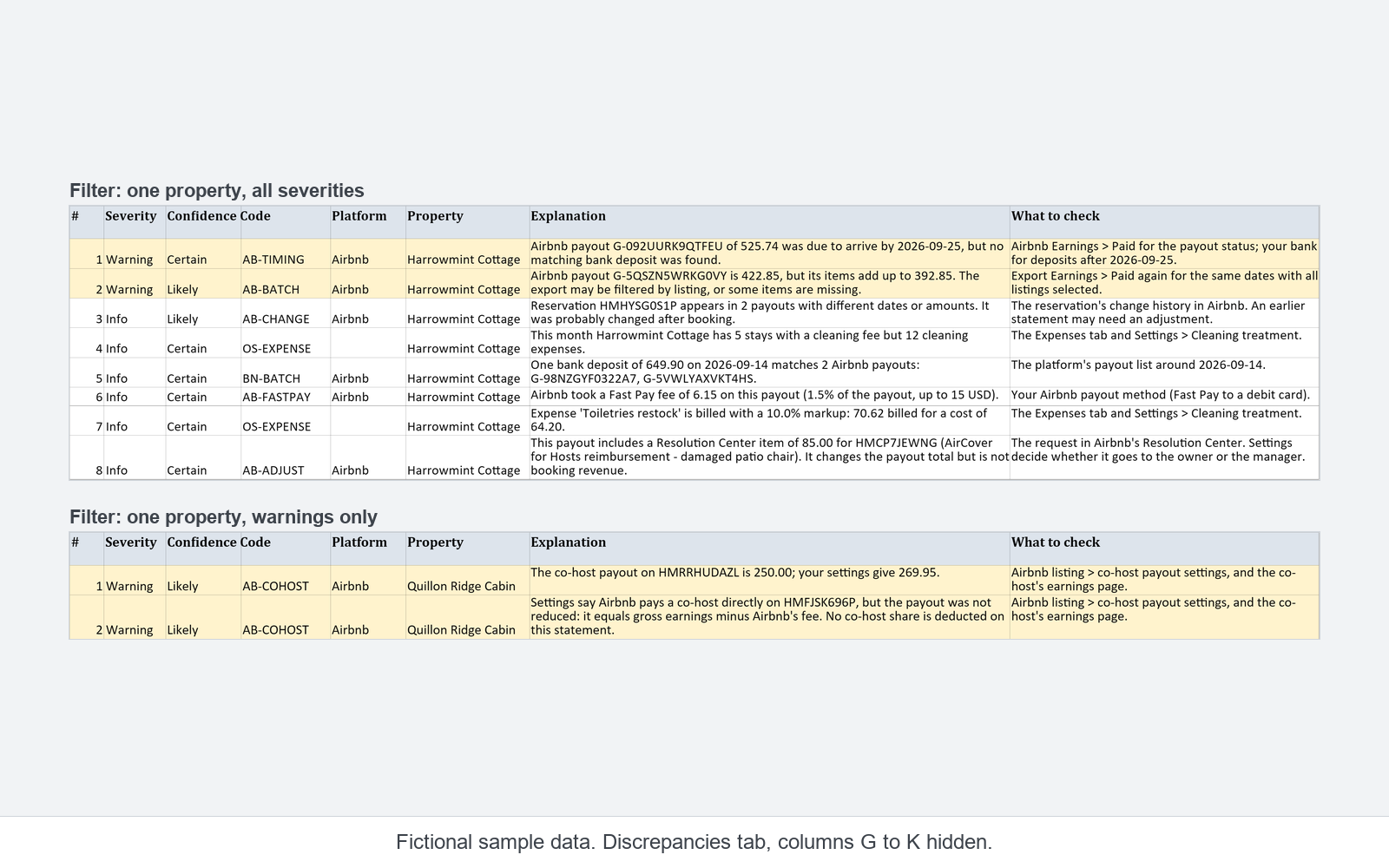
The free example is a read-only copy with fictional data. It does not work with your own reports.
Sources
- How co-host payouts work, Airbnb Help Center (Help 3389). Read 2026-11-07.
- Split payouts between different payout methods, Airbnb Help Center (Help 1343). Read 2026-11-07.
- Calculating your payout, Airbnb Help Center (Help 459). Read 2026-10-30.
- What an adjustment on your earnings means, Airbnb Help Center (Help 366). Read 2026-10-30.
Quotes are copied word for word from these pages as read on the dates shown. Airbnb may change its pages.