
Payout Reconciliation Workbook
For Airbnb co-hosts and small managers with 1 to 10 properties
Your Airbnb deposit is smaller than the booking, or it does not match a payout.
This workbook helps you find out why.
Paste your Airbnb CSV and your bank CSV; it links each Airbnb payout to a bank deposit, puts a reason code and a plain-English note on the Airbnb lines it flags, and builds a monthly statement for each owner.
One price, $39. 30-day refund, no questions asked. Airbnb and one bank account; Booking.com and Vrbo are not in this version. A macro-free workbook for Google Sheets and Excel 365. No account connection. Checkout is handled by Polar, the merchant of record.
How it works
Once a month, about 10 days after the month ends. Before the first month, you enter settings for each property and owner.
-
Download your Airbnb report
In Airbnb, go to Earnings > Paid and download the report as a CSV file, with all listings and all fields selected, for dates from 10 days before the month to 10 days after it. Menu names in Airbnb may differ slightly.
-
Get your bank CSV
Export the checking account that receives your Airbnb payouts, for the month plus 10 days, as a CSV file.
-
Paste and review
Paste both files into the workbook. You see which Airbnb payouts matched a bank deposit, a reason code and a note on the lines it flags, and a statement for each owner that you can print to PDF.
Discrepancies
-
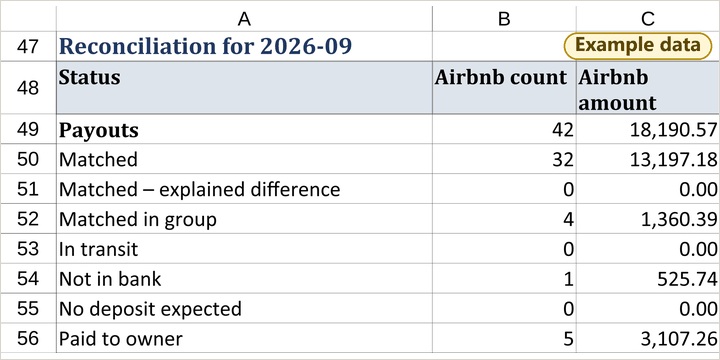
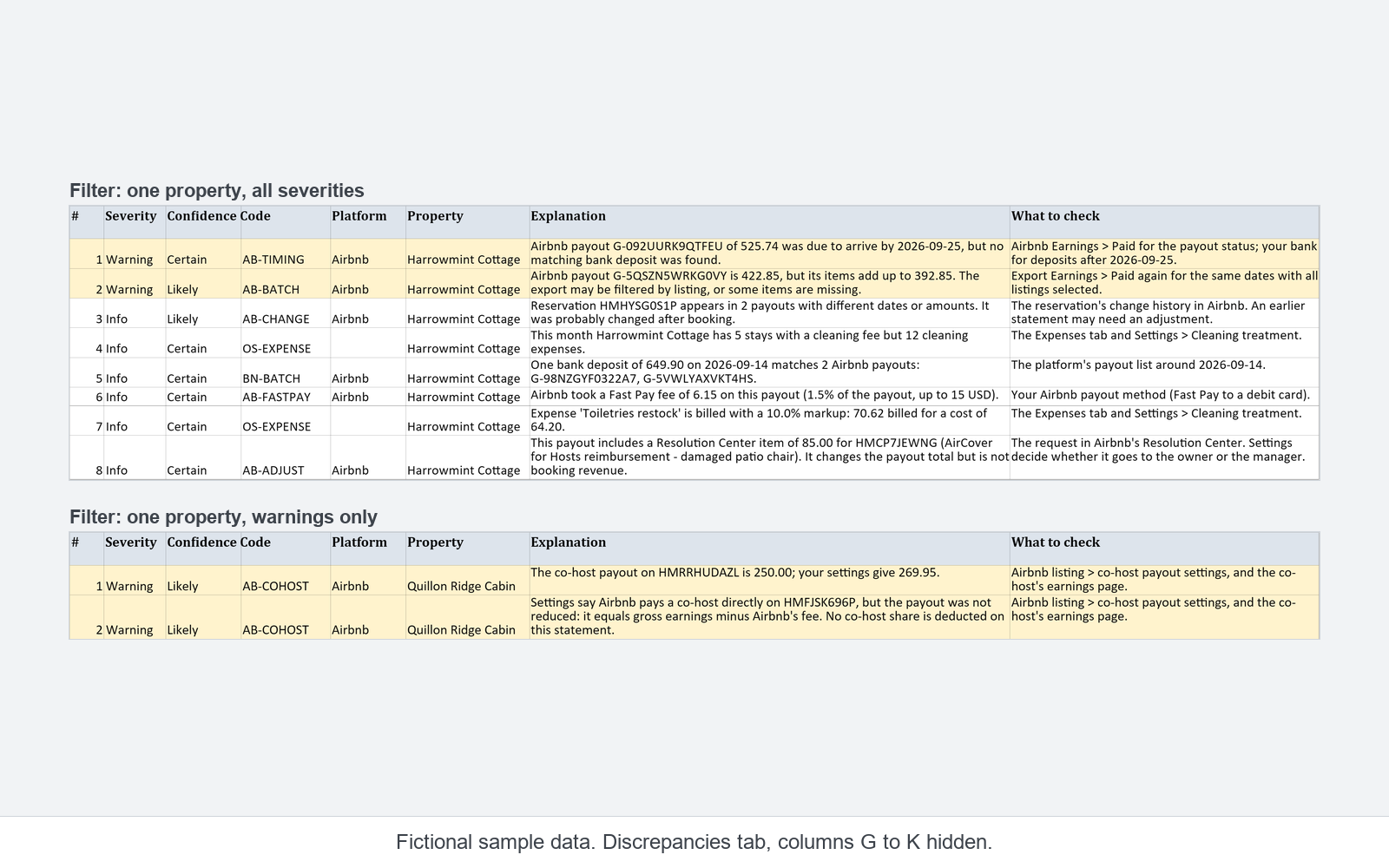
Airbnb payout G-092UURK9QTFEU of 525.74 was due to arrive by 2026-09-25, but no matching bank deposit was found.
-
The co-host payout on HMRRHUDAZL is 250.00; your settings give 269.95.
-
One bank deposit of 649.90 on 2026-09-14 matches 2 Airbnb payouts: G-98NZGYF0322A7, G-5VWLYAXVKT4HS.
-
Airbnb payout G-5QSZN5WRKG0VY is 422.85, but its items add up to 392.85. The export may be filtered by listing, or some items are missing.
Cases it names
Examples of what the workbook names on the lines it flags, each with a reason code and a plain-English note:
- One bank deposit that covers several Airbnb payouts (
BN-BATCH). - The share Airbnb paid directly to a co-host, compared with your settings (
AB-COHOST). - A cancellation, a partial refund or a host cancellation fee taken from a payout (
AB-CANCEL). If it belongs to a stay from an earlier month, it goes on its own statement line (OS-ADJUST). - Two different Airbnb service fee models on one property in the same month (
AB-FEE). - A Fast Pay fee (
AB-FASTPAY). - A stay of 28 nights or more, which Airbnb pays out in monthly parts (
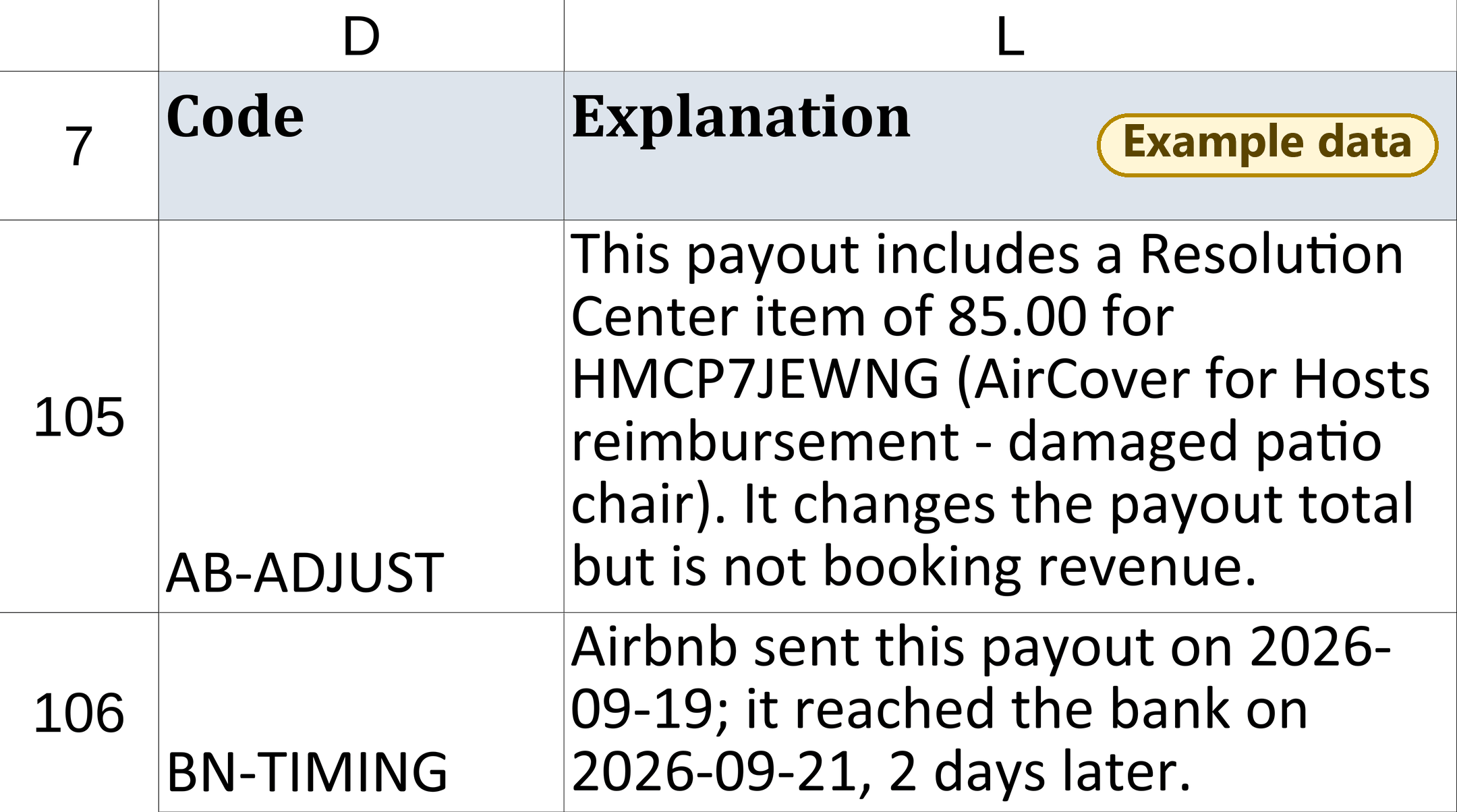
AB-LONGSTAY). - A Resolution Center item, such as an AirCover reimbursement (
AB-ADJUST). - A cleaning expense billed to the owner while the manager keeps the cleaning fee (
OS-EXPENSE). - A payout that was due but is not in the bank, or a check-in and payout in different months (
AB-TIMING). - A deposit that arrived a little after the expected window, or a payout sent on a weekend (
BN-TIMING). The window counts business days and the bank holidays you list. - An Airbnb amount that does not equal gross minus fees (
AB-OTHER). - A bank deposit that looks like Airbnb but matches no payout in the report you pasted (
BN-OTHER). - An effective commission rate that differs from your percentage because the commission base is not gross revenue (
OS-BASE).
It checks only the rows you paste. The user guide lists the codes.
What it adds
A status like Over or Under tells you something is off. This workbook adds two things, both for Airbnb only.
The reason, on Airbnb lines
- For Airbnb payouts, it explains why a line does not match, with a reason code and a plain-English note. Each flagged line also says where to look next.
- It tells apart things like a tax withholding, a Resolution Center adjustment, a co-host payout and a payout that has not arrived yet.
- It flags an Airbnb payout that was due but has no matching bank deposit.
- Deposits from other channels show up as unmatched. The workbook does not read Vrbo or Booking.com reports.
The co-host share, on the statement
- It shows the share Airbnb paid directly to a co-host as its own line on the owner statement, based on the settings you enter for each property.
- If you are the co-host, the workbook can treat that share as your commission so it is not counted twice. This depends on one setting; the guide explains it.
- It calculates the management commission and passes expenses on to the owner, using your settings.
The results depend on the settings you enter. Each property has more than ten of them, and the workbook cannot know when one is wrong. Set them up with the guide and check the figures before you send a statement.
Who it is for
- You co-host or manage 1 to 10 properties in the United States, and your bookings come through Airbnb.
- Your Airbnb payouts go to a checking account you can export as CSV.
- You owe owners a monthly statement with your commission, any co-host share and expenses.
- You are comfortable pasting two files into a spreadsheet each month and entering settings once.
Who this is not for
There are free templates and free trackers for short-term rental hosts. For some people they are the better choice.
- If you also take bookings on Vrbo or Booking.com, this version will not read those payouts. A free multi-channel template is a better fit today.
- If you have no co-host and no management commission to work out, you probably do not need this.
- If you only want to know whether a property makes a profit, a free profit tracker will get you there faster.
- If you manage more than 10 properties, or need trust accounting, this is not the right tool.
- If you want reports that update themselves, this is not it. You paste the files each month.
What you get
Files in your purchase
example data
Payout-Reconciliation-Workbook-v1.0.1.xlsx: the workbook.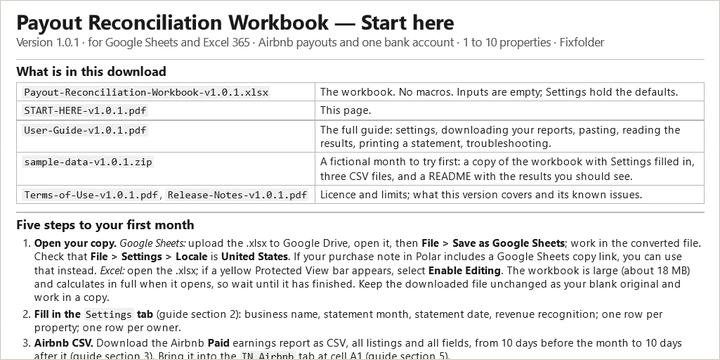
START-HERE-v1.0.1.pdf: one page. What to do first, including how to open the workbook in Google Sheets.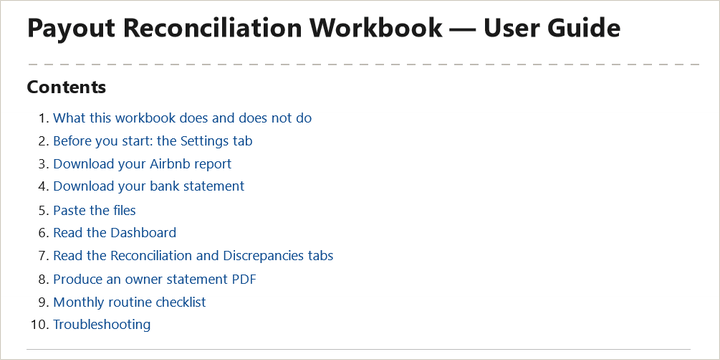
User-Guide-v1.0.1.pdf: settings, downloads, pasting, the reason codes, printing statements, troubleshooting.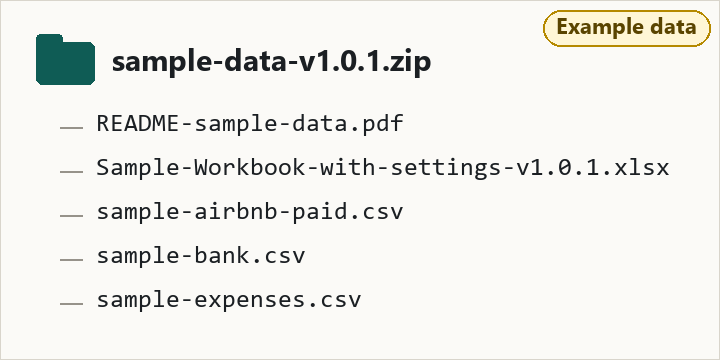
sample-data-v1.0.1.zip: a fictional business for one month, so you can see a full run before you paste your own reports. We wrote the sample data ourselves.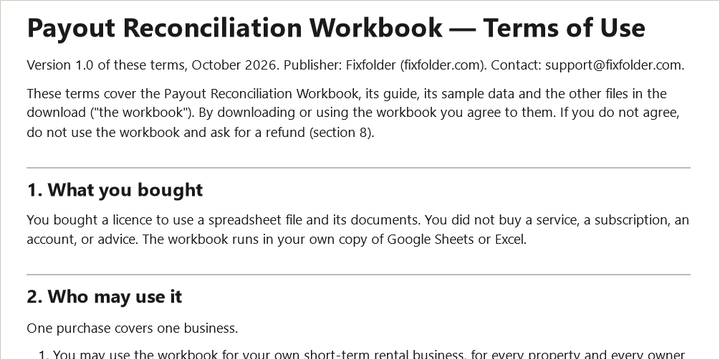
Terms-of-Use-v1.0.1.pdf
Release-Notes-v1.0.1.pdf: release notes for version 1.0.1.


What the workbook does
- Finds report columns by their names, not their position.
- Links each Airbnb payout to its reservations and to a bank deposit, including one deposit that covers several payouts.
- Gives each payout a status, such as Matched, In transit or Not in bank.
- Lists the lines it flags with a reason code, a plain-English note and what to check.
- Calculates your commission on one of five commission bases you choose per property.
- Adds expenses per property or shared across properties, with optional markup.
- Builds a monthly statement per owner (or an owner invoice when the owner owes you), in Letter or A4, that you can print to PDF. The statement covers Airbnb income only.
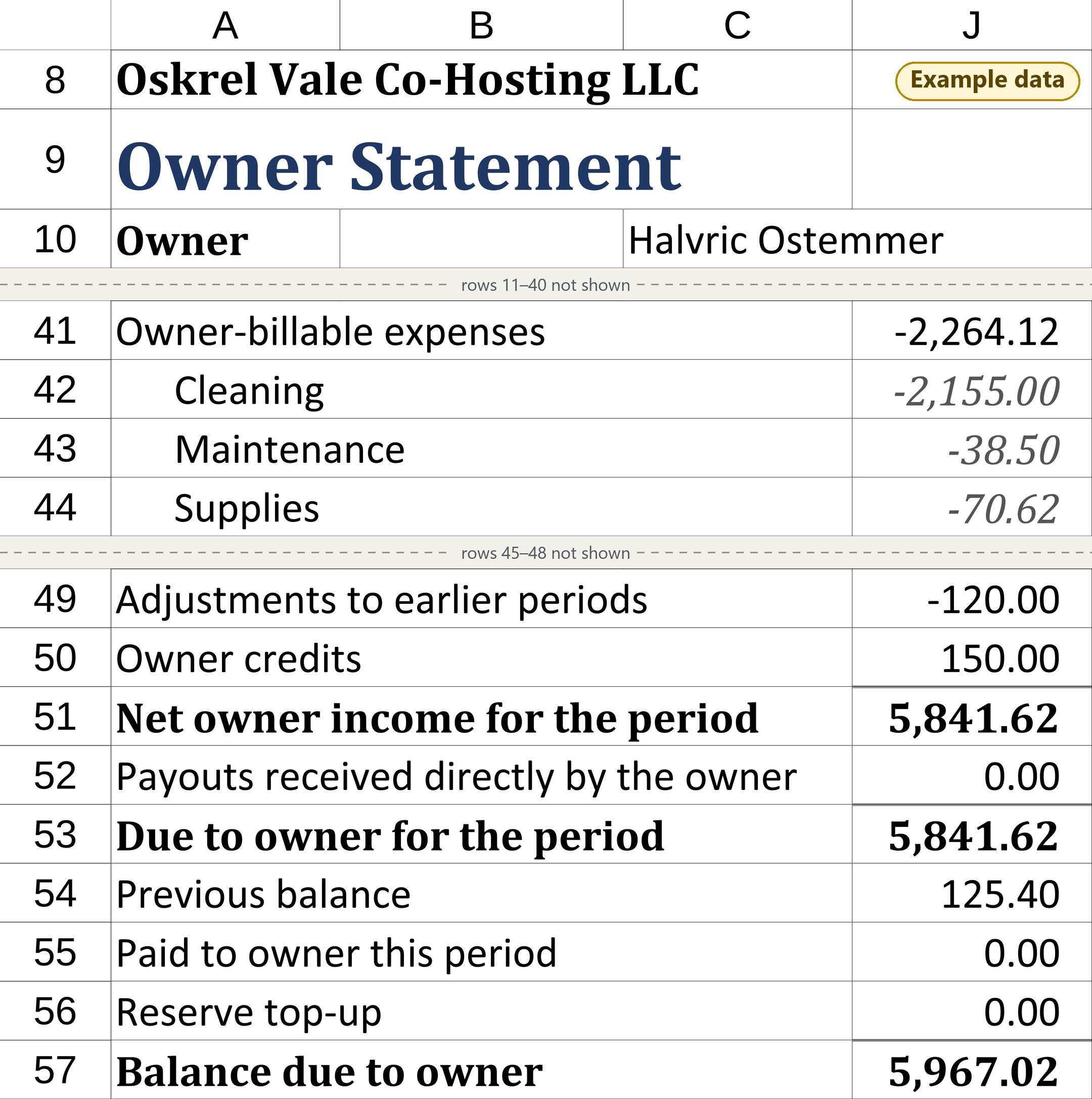
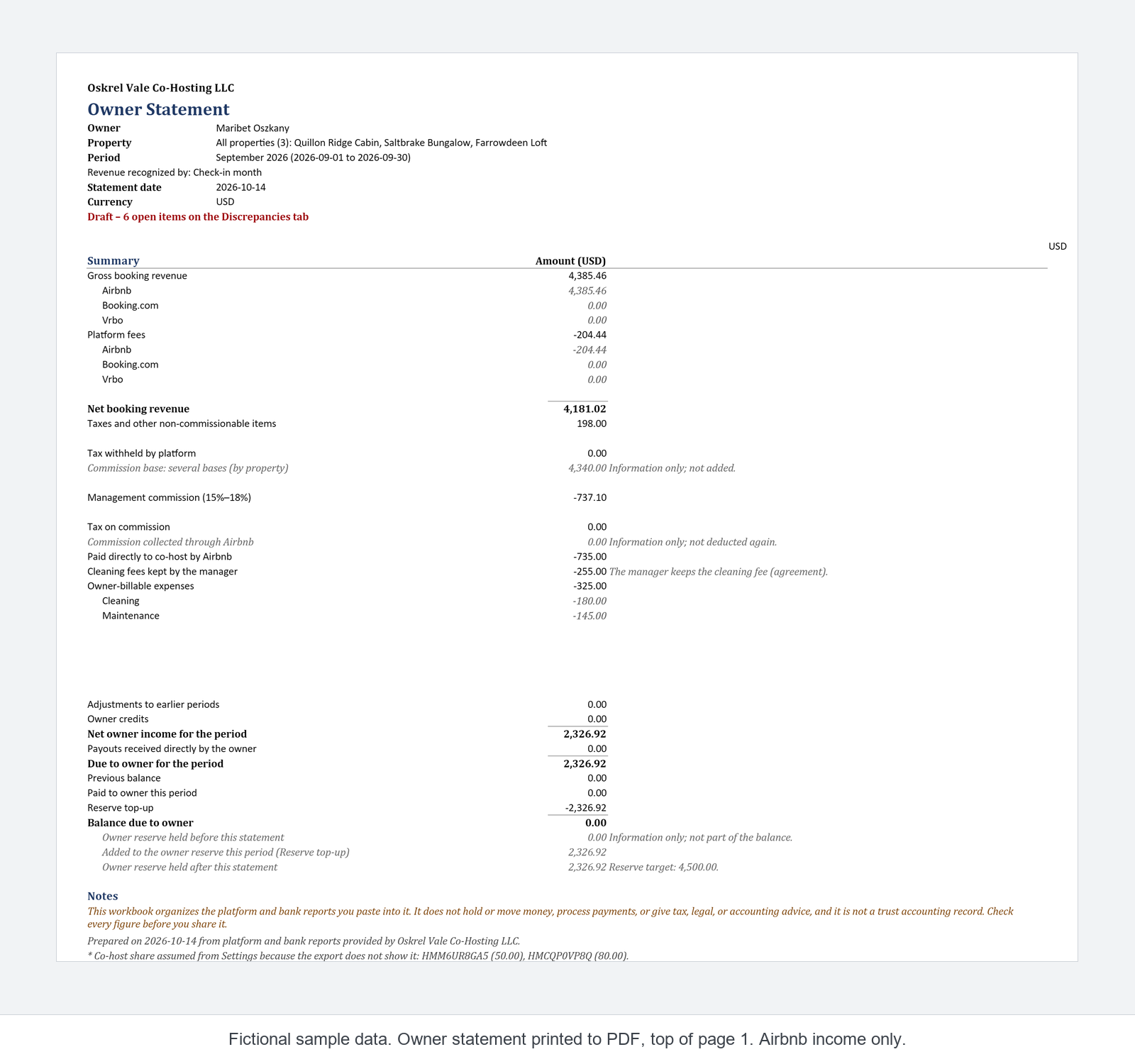
| Line | USD |
|---|---|
| Gross booking revenue | 4,385.46 |
| Platform fees | -204.44 |
| Net booking revenue | 4,181.02 |
| Taxes and other non-commissionable items | 198.00 |
| Management commission (15%–18%) | -737.10 |
| Paid directly to co-host by Airbnb | -735.00 |
| Cleaning fees kept by the manager | -255.00 |
| Owner-billable expenses | -325.00 |
| Net owner income for the period | 2,326.92 |
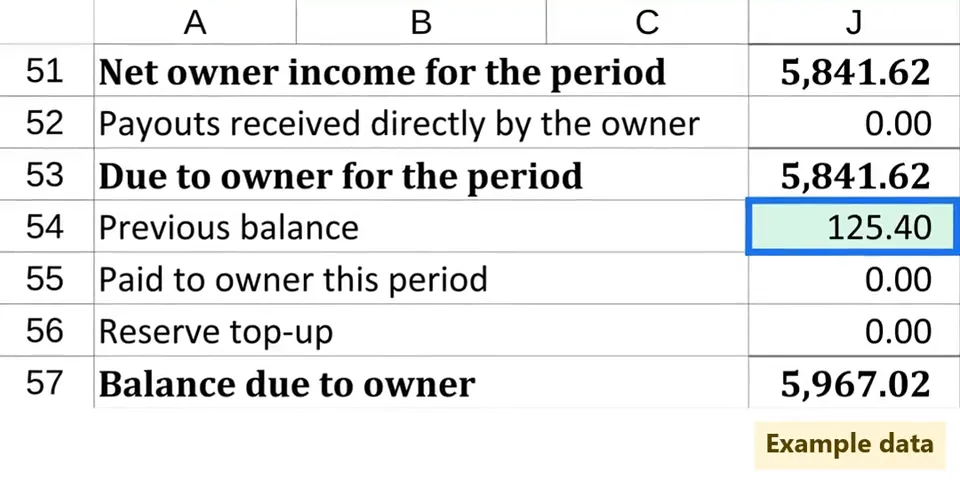
Summary lines from the statement in the screenshot below. Fictional sample data. Airbnb income only. The full statement continues with the owner reserve and the balance due.
What it does not do
This workbook organizes the platform and bank reports you paste into it. It is a tool for checking figures, not a financial service.
- It does not hold, move or transfer money. It does not pay owners or collect from them. A statement is a summary, not a payment instruction.
- It does not process payments.
- It does not give tax, legal or accounting advice. Tax amounts from the Airbnb report are shown on their own lines. It does not prepare tax returns or classify expenses for tax purposes.
- It is not a trust accounting record. It does not compare a trust or escrow balance with owner balances.
- It is not a property management system. It does not handle bookings, guests, calendars or messages.
- It does not connect to Airbnb, your bank or any other account. No API, no bank login, no browser add-on. You paste the files by hand.
Limits of version 1.0.1
What it will not catch
- It flags an Airbnb payout that is larger or smaller than the lines behind it, late, or missing from the bank. When a payout is smaller than its lines, the workbook shows a Warning and marks the owner statement Draft. It checks only the rows you paste, and it does not compare a payout with lines in another currency.
- The statement covers Airbnb income only. It still prints lines for Booking.com and Vrbo, and they show 0.00. If an owner also earns on those channels, the statement is not their full income.
- If the Airbnb report has a co-host payout line for a property and the Co-host is the manager setting is empty, the workbook stops that owner’s statements until you fill it in. If you are the co-host and the setting says N, your commission is deducted twice, and the workbook cannot tell. Check this setting for each property before the first statement.
- Deposits from Vrbo, Booking.com or a payment processor are listed as unmatched. The workbook does not explain them.
Size
One copy of the workbook is for 1 to 10 properties. Each month's paste can hold:
| Item | Limit |
|---|---|
| Rows in the Airbnb report | 1,200 |
| Rows in the bank statement | 800 |
| Payouts in the Airbnb report | 600 |
| Reservations in the Airbnb report | 600 |
If a report is larger, the workbook says so and stops matching for that file. The guide explains how to shorten the date range or split properties by payout account.
Platforms and banks
- Airbnb Paid earnings report (CSV), with your Airbnb account in English.
- One bank account per workbook copy. Header formats for Chase, Bank of America, Capital One 360 and Mercury are recognized; other banks use a manual column setup. Only the Chase format is covered by our sample data; the others have not been tested against real bank files.
- Booking.com and Vrbo are not in this version.
- No currency conversion. Properties in another currency get a separate section on the statement.
Spreadsheet apps
- Google Sheets (free Google account). Checked by hand with our fictional sample data (October 2026).
- Excel 365: an Excel file is included; our hands-on check so far was in Google Sheets.
- Excel for the web: the user guide describes a paste route for it, with its limits.
- No macros, scripts or add-ins. The workbook runs on ordinary cell formulas.
What we have and have not checked
- Checked by hand in Google Sheets with our fictional sample data (October 2026).
- The sample data is fictional. We wrote it ourselves. The sample set in the download differs slightly from the set we checked by hand; the release notes say how.
- An Excel 365 file is included; our hands-on check so far was in Google Sheets.
- Not yet tested with a real customer's files. If it does not fit your export, use the 30-day refund.
Your data stays in your file
The workbook lives in your own Google Drive or on your own computer. The reports you paste stay in that file. The workbook does not send anything anywhere, and we never see your payouts, bank lines or owner details.
The workbook does not store owner email or postal addresses. You send each statement PDF yourself. This website uses no cookies, analytics or tracking scripts.
Questions
There are free templates. Why pay for this one?
A free template can tell you a payout is Over or Under. This workbook also tells you why, for Airbnb payouts, and it puts the share Airbnb paid directly to a co-host on the owner statement as its own line. It is narrower than the free options: Airbnb only. If you use Vrbo or Booking.com, or have no co-host or commission to work out, a free template may suit you better.
What is your refund policy?
30-day refund, no questions asked. Within 30 days of your purchase, email support@fixfolder.com from the email address you used at checkout and say you want a refund. You do not need to give a reason.
We refund the full price, with any sales tax you paid. The refund is issued through Polar, the merchant of record that processed your payment.
Do I need to connect my Airbnb or bank account?
No. You download two CSV files yourself and paste them in. The workbook has no connection to Airbnb, your bank or any other service.
Where does my data go?
Nowhere. It stays in your copy of the workbook, in your Google Drive or on your computer. When you contact support, please describe the problem and the code you see (for example AB-BATCH or V04) instead of attaching your full reports, which contain guest and bank details.
What do the reason codes look like?
They are short English labels such as AB-TIMING or AB-COHOST. The first two letters say where the item comes from: AB for the Airbnb report, BN for the bank statement, OS for the owner statement. A code names the kind of item; the plain-English note next to it says what happened and what to check, and the user guide lists them.
Is this tax or accounting software?
No. It matches Airbnb payouts with bank deposits and lays out owner statements from the figures in your reports and your settings. It does not give tax, legal or accounting advice, and it is not trust accounting. Ask a qualified professional about tax questions.
Does it work with Booking.com or Vrbo?
No. Airbnb and one bank account. Booking.com and Vrbo are not in this version. Deposits from those channels show up as unmatched, and the owner statement covers Airbnb income only.
Google Sheets or Excel: which do I use?
The workbook is one .xlsx file. Our hands-on check was in Google Sheets, so that is the route we can vouch for today; START-HERE-v1.0.1.pdf explains how to open the workbook there. In Google Sheets, you print statements with File > Print > Selected cells, as the user guide explains. You can also open the file in Excel 365; we have not finished our own check there.
I manage more than 10 properties. Will it work?
This version is for 1 to 10 properties. If Airbnb pays groups of properties to different bank accounts, you can use one copy of the workbook per account, each within the row limits above. If one account receives everything and the reports are larger than the limits, this is not the right tool.
Do I get updates?
If we correct version 1.0.1, the corrected files are added to your Polar purchase at no extra cost; a later version with new features may be sold separately.
Your purchase includes version 1.0.1. Your files stay available in your Polar customer portal.
How do I get help?
Email support@fixfolder.com. Tell us whether you use Google Sheets or Excel, and the code or message you see on the Dashboard. The user guide's troubleshooting section covers the input codes.
Can I share the workbook with my team?
You can use it for your own business, including the people who work in it. Please do not resell or share the files outside your business. See the terms of use.
Price
Payout Reconciliation Workbook, version 1.0.1
$39 one price, one-time, USD
In the US, sales tax, where it applies, is added at checkout. In most other countries, the price includes tax.
- Workbook (
.xlsx) for Google Sheets and Excel 365 - Start page, user guide, sample data, terms of use, release notes
- Airbnb and one bank account, 1 to 10 properties
- 30-day refund, no questions asked
- Email support: support@fixfolder.com
Checkout, payment, receipts and sales tax are handled by Polar (polar.sh), which acts as merchant of record. Best for Airbnb-only co-hosts and small managers who owe owners a monthly statement.